

One to Rule them all

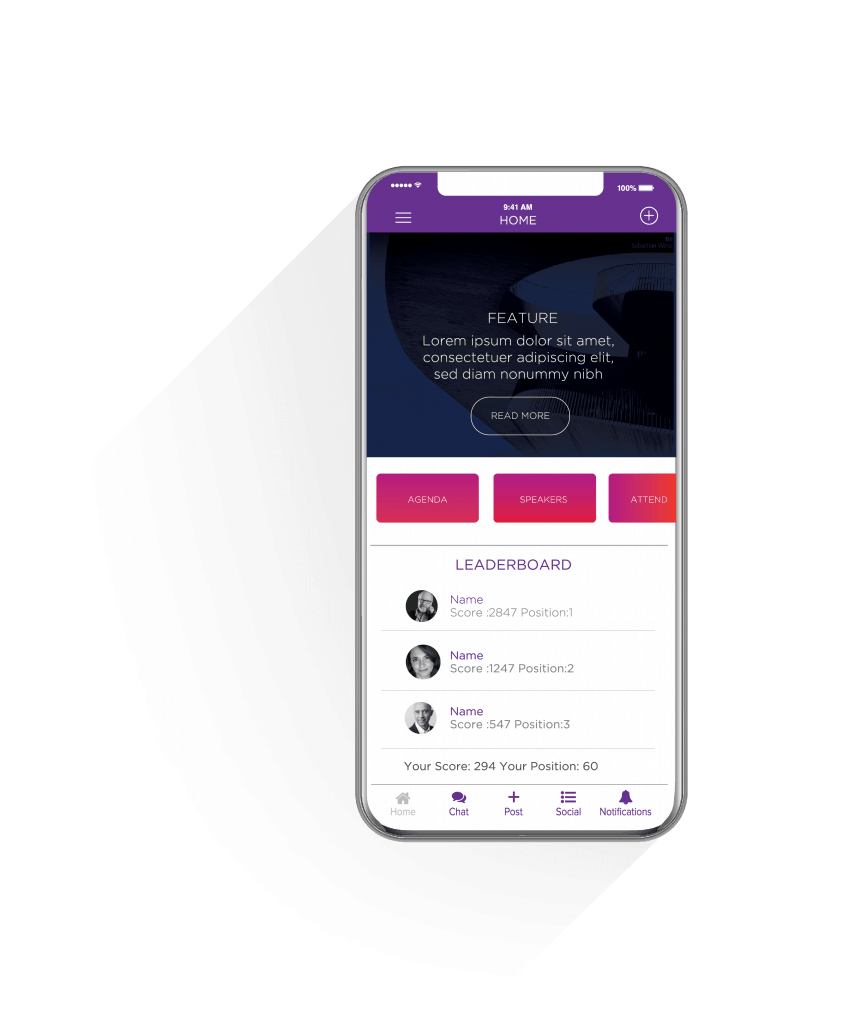
HOME SCREEN

Shortcuts to all parts of the app and information critical front and centre live on the home page. The Feature Screen slides and can link to external URL’s

description

Lorem ipsum dolor sit amet, consectetur adipiscing elit, sed do eiusmod tempor incididunt ut labore et dolore enim ad minim veniam, quis nostrud exercitation ullamco laboris nisi ut aliquip

gamification

info tiles

speakers

partners

social

Lorem ipsum dolor sit amet, consectetur adipiscing elit, sed do eiusmod tempor incididunt ut labore et dolore enim ad minim veniam, quis nostrud exercitation ullamco laboris nisi ut aliquip

Lorem ipsum dolor sit amet, consectetur adipiscing elit, sed do eiusmod tempor incididunt ut labore et dolore enim ad minim veniam, quis nostrud exercitation ullamco laboris nisi ut aliquip

Lorem ipsum dolor sit amet, consectetur adipiscing elit, sed do eiusmod tempor incididunt ut labore et dolore enim ad minim veniam, quis nostrud exercitation ullamco laboris nisi ut aliquip

Lorem ipsum dolor sit amet, consectetur adipiscing elit, sed do eiusmod tempor incididunt ut labore et dolore enim ad minim veniam, quis nostrud exercitation ullamco laboris nisi ut aliquip

Lorem ipsum dolor sit amet, consectetur adipiscing elit, sed do eiusmod tempor incididunt ut labore et dolore enim ad minim veniam, quis nostrud exercitation ullamco laboris nisi ut aliquip

Lorem ipsum dolor sit amet, consectetur adipiscing elit, sed do eiusmod tempor incididunt ut labore et dolore enim ad minim veniam, quis nostrud exercitation ullamco laboris nisi ut aliquip

A dashboard

for complete control

People can experience Augmented Reality through a web browser without having to download an app, using Augmented Reality platform that has the capability to convey any kind of message, with cool effects! 

Email templates

The Email Templates section is where you can configure your email template that you will be sending out to users or attendees for the invite.

Interaction Stats

The app interaction stats section shows statistics that have to do with how the user has interacted in the social page.

Reports

The Report section gives the admin a statistical overview of the event

Setup

In the Setup section is where you setup up initial event registration details

People

The People section shows the admin all users that are loaded onto the application, registered and unregistered users.

Push Notifications

The section where admins can send push notifications to app users.

Agenda

Admins can view, delete and a edit all agenda items, speakers, locations and any other related info.

Polls/Surveys

This is where admins can manage the polls, by viewing, adding, editing and deleting polls. A summary of the poll results is also shown on this page

Sponsors

In this section, you can add, view, edit and delete sponsors

Sections

Here you can add, view, edit and delete content sections you would like to add on the app. Admin can also can enable and disable sections.

Categories

Admin can add, view and delete categories. Admins can make the categories default and visible

Sponsors

In this section, you can add, view, edit and delete sponsors

Check-in

In this section, the admin can scan a users QR code, check them in and print out lanyards.

Banner

Admin can add, view and delete categories. Admins can make the categories default and visible

Sponsors

In this section, you can add, view, edit and delete sponsors

Registration

In this section, you can add new fields that will be used and shown on the registration page when a user logs into the app. The fields can be marked as required and if they should be made public when users view their profile.

Notifications

In this section is where the admin can send notifications to a group of users based on their categories and can link the notification to a page/section on the app. Admin can also send notification as an SMS, if SMS fails an email will be sent out. You can schedule when to send out notifications


Successfully used by

Contact Us

  • This field is for validation purposes and should be left unchanged.